The WordPress theme Twenty Twelve was officially released early today! If you are looking for a simple, easy to use and clean coded free WordPress theme, the Twenty Twelve is for you.
OK, here is a screenshot of the latest new free WordPress theme from the WordPress official site wordpress.org
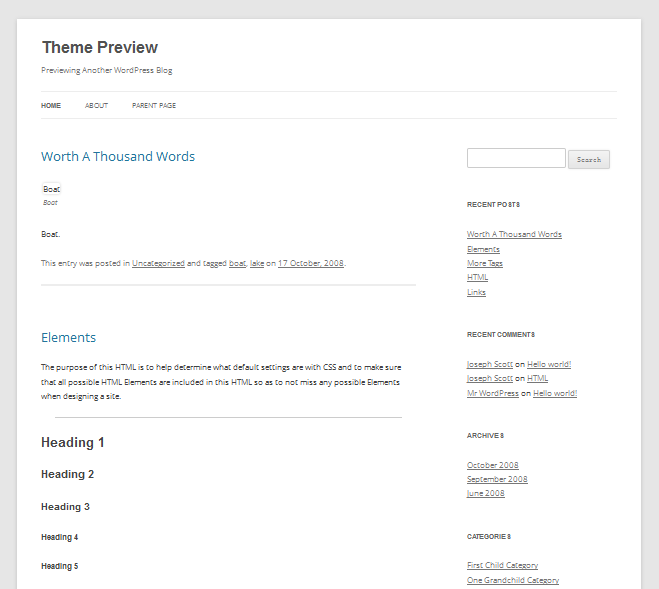
Free WordPress theme: twenty twelve theme
Twenty Twelve is an elegant, readable, and fully responsive theme that makes your site content look its best on any device.
The free WordPress theme Twenty Twelve is a fully responsive theme that looks great on any device, there is no need to looking for a mobile theme or pad theme now, you can use this cool responsive free WordPress theme, which is great for blogs. Features include a front page template with a its own widgets, styling for post formats on both index and single views, an optional display font, and an optional no-sidebar page template. Make it yours with header image, a custom menu, and background. I have used the Twenty Ten theme and Twenty Eleven, and found the Twenty Twelve theme is the best one. Responsive, html5 ready, a lot new features support the WordPress latest version. If you are looking for a valid coded, search engine optimized simple easy to use free WordPress theme, the Twenty Twelve is for you.
Twenty Twelve Front Page Template
A key component of this theme is a special front page template. This template meets the need for a carefully crafted introductory page. Add text, images, video, anything you’d like to the upper area, then arrange front-page-only widgets below in one or two columns.
Responsive, Mobile-first Layout
What makes this theme really shine are the design details. Starting with a thoughtfully crafted mobile-first layout, Twenty Twelve is intended to be viewed on any size device from smartphones and tablets up to the latest and greatest HiDPI screens. No matter how your readers decide to visit, it’ll remain good-looking, readable, and usable.
Widgets and No-sidebar Layout
Twenty Twelve loves the no-sidebar look as much as you do. Use the optional “Full-width page, no sidebar” page template to remove the sidebar from any page. Want to simplify even more and remove the sidebar from all your posts and pages? You guessed it! Simply remove any active widgets to the Main Sidebar area and the sidebar will disappear.
Key features:
custom-background, custom-header, custom-menu, editor-style, featured-images, flexible-header, flexible-width, full-width-template, gray, light, microformats, one-column, post-formats, right sidebar, rtl-language-support, sticky-post, theme-options, translation-ready, two columns, white
You can get a demo version here
or
just download directly here or view the details page here.