Transfer WordPress Image Captions to HTML5

The html5 is a new web standard, more and more websites using html5 now. The default WordPress theme twentyeleven using html5, but some of the elements still don’t use the html5 code, just like the image and captions uploaded by the users. This article will help you convert the WordPress default image caption elements to html5 code.

How to add images with captions

Many of you might already be aware of how to do this, but let’s cover the basics for those WordPress users who don’t.

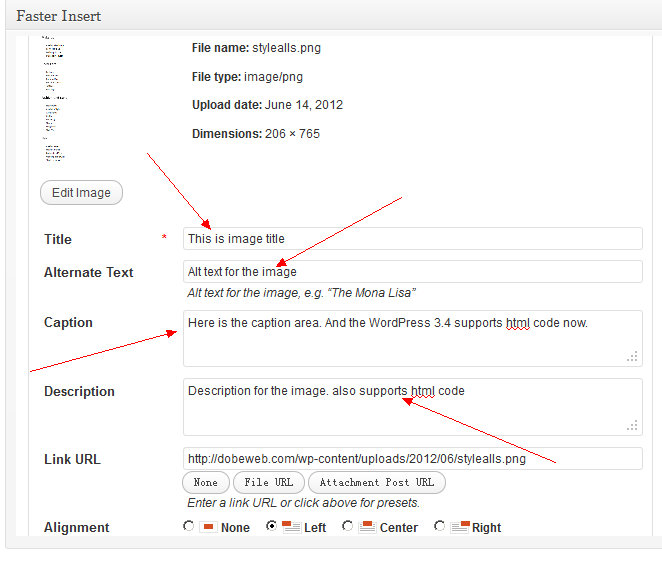
To add an image caption, you must first upload an image using the WordPress media uploader. Once you’ve uploaded an image, you should see an input box labeled “Caption,” which is where you’d add your image caption, as shown in the following screenshot.

wordpress image upload

WordPress image caption

To insert the image with a caption into your post, you’d simply click the “Insert into Post” button just like you would with any other image.

The default code of the html4 for each image will display like this:

<div id="attachment_xxx" class="wp-caption aligncenter" style="width: 310px">
    <a href="image.jpg">
        <img class="size-medium wp-image-xxx" height="80" width="300" alt="" src="thumbnail.jpg" title=" ..." />
    </a>
    <p class="wp-caption-text" > Here is the image caption</p>
</div>

If you use html5, the code should be

<figure id="attachment_xxx" class="wp-caption aligncenter" style="width: 310px">
    <a href="image.jpg">
        <img class="size-medium wp-image-xxx" height="80" width="300" alt="" src="thumbnail.jpg" title=" ..." />
    </a>
    <figcaption class="wp-caption-text">Here is the image caption</figcaption>
</figure>

How to transfer the default code to html5? Here it is: open the functions.php (you can find it in the theme folder), then copy and paste the following php code to the functions.php

add_filter('img_caption_shortcode', 'html5_img_caption_shortcode', 1, 3 );
function html5_img_caption_shortcode($string, $attr, $content = null) {
    extract(shortcode_atts(array(
        'id'    => '',
        'align' => 'alignnone',
        'width' => '',
        'caption' => ''
    ), $attr)
    );
    if ( 1 > (int) $width || empty($caption) )
        return $content;
 
    $width_style= ' style="width: ' . $width . 'px"';
    if ( $id ) $id = 'id="' . esc_attr($id) . '" ';
 
    return '<figure ' . $id . 'class="wp-caption ' . esc_attr($align) . '"' . $width_style . ' >' .
        do_shortcode( $content ) .
        '<figcaption class="wp-caption-text">' . $caption . '</figcaption>'.
        '</figure>';
}

That’s it, and it is easy to use.

convert wordpress caption to html5,wordpress イメージ キャプション,wordpress extract image caption,wp captions in html5 wordpress,wordpress post image to figure html5,wordpress insert images in figure figcaption,wordpress html5 get img,wordpress html5 figure,wordpress html5 caption,transfer theme captions,transfer of images in html5,html5 figure caption wont go under pic,html5 covers - image or figure,html5 caption section content,figure html5 wordpress,figcaption wordpress,extract image size as class wordpress,convert wordpress content to html [caption id=,wp-caption html5 wordpress

Leave a comment