Browsing articles in "Wordpress Plugins"
WordPress Best Backup Plugin: Backup Buddy from iThemes
Have you backed up your WordPress based websites already? Do you want to backup all your site just some clicks, not only the themes you use, the plugins you use, the files you have uploaded, not only the database? If you want to backup you site easily, here is the solution.
Based on our experience, we knew a backup solution would need to:
1. Completely backup database and files
2. Be convenient to create
3. Provide quick and easily restoration
4. Be trustworthy and reliable

Some of you may use the most popular free WordPress backup plugin WP-DB-Backup, and previously, so do I, also I use the free WordPress backup plugin WP-DB-Backup. WP-DB-Backup allows you easily to backup your core WordPress database tables. You may also backup other tables in the same database. Each time, after I backed up my database, then I will download the files I have uploaded, backup the theme and plugins I use. If I want to restore the site, I need to upload and restore all files one by one. Yes, it seems easy, but time consuming! How do you think. When I meet the backupbuddy, this plugin let me FREE!
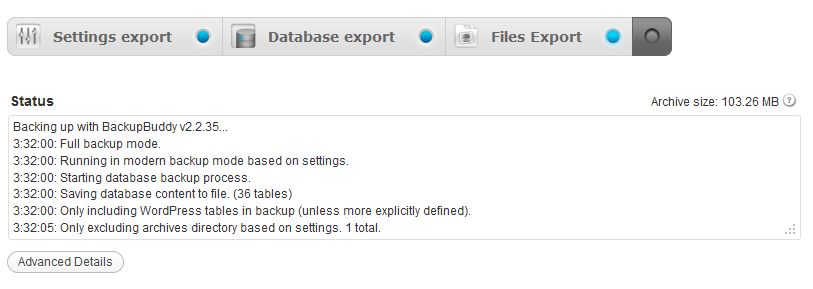
Here is the main menu of the backupbuddy, just some easy settings, you can backup all you site’s files, not only the database! BackupBuddy is the all-in-one solution for backups, restoration, and migration. The single backup ZIP file created can be used with the import & migration script to quickly and easily restore your site on the same server or even migrate to a new host with different settings. Whether you’re an end user or a developer, this plugin will bring you peace of mind and added safety in the event of data loss. The goal of this premium WordPress backup pluginis keeping the backup, restoration, and migration processes easy, fast, and reliable.
Minimum Configuration
Please configure the following items on the BackupBuddy Settings page before getting started:
- Email notifications – This will enable status email notifications.
- ImportBuddy & RepairBuddy passwords – This will allow you to download these scripts.
Backup

- Perform a Full Backup by clicking `Full Backup` button on the Backup page. This backs up all files in your WordPress directory (and subdirectories) as well as the database. This will capture everything from the Database Only Backup and also all files in the WordPress directory and subdirectories. This includes files such as media, plugins, themes, images, and any other files found.
- Perform a Database Backup regularly by clicking `Database Backup` button on the Backup. The database contains posts, pages, comments widget content, media titles & descriptions (but not media files), and other WordPress settings. It may be backed up more often without impacting your available storage space or server performance as much as a Full Backup.
- Local backup storage directory: /home/myhai0/public_html/dobeweb/wp-content/uploads/backupbuddy_backups/

Restoring, Migrating
- Upload the backup file and ImportBuddy Script (obtained on the Backup & Restore page) to the root web directory of the destination server. Do not install WordPress on the destination server. The importbuddy.php script will restore all files, including WordPress.
- Create a mySQL database on the destination server.( Tutorial Video & Instructions Here )
- Navigate to importbuddy.php script in your web browser on the destination server. If you provided an import password you will be prompted for this password before you may continue.
- Follow the importing instructions on screen. You will be asked whether you are restoring or migrating.
Scheduled Backups
There is no need to setting the Backups in the future, the plugin will backup you site automatically! Keep your data in a safe place!
Make sure your WordPress site is safe and secure with BackupBuddy. There’s never been a better time than now:
And here is a 40% off BackupBuddy coupon code for you through March 31, 2012, check it here.
ithemes repairbuddy,backup and restore wp plugins,How to do plugins wordpress,free wordpress backup,e-commerce backup buddy,best wp backup plugin complete restore,best wordpress backup plugin,best free restore plugin wordpress,best free backup plugin wordpress,best backup tool for wordpress ecommerce,best backup plugin,backupbuddy wordpress for free,backupbuddy restore only the database?,backupbuddy migration,backupbuddy how to restore only the database,backupbuddy changing local backup storage directory,backupbuddy change local backup storage directory,backup buddy wordpress plugin free download,what is import buddy script25% OFF BackupBuddy Coupon Code Sep 2011
Grab the latest new BackupBuddy coupon code to SAVE 25% ON ALL BACKUPBUDDY PACKAGES (INCLUDING PLUGINBUDDY DEVELOPER SUITE)
The BackupBuddy is really a powerful WordPress backup and migration plugin, if your site running on WordPress, why not keep your site in security?
Don’t have a solid backup strategy for your site? Need to move test sites to active domains? BackupBuddy is here to help–with new multisite support! Save 25% from now until Saturday, September 17th with coupon code
Backup Buddy new coupon code for BACKUPLOVE
on all BackupBuddy packages and the PluginBuddy Developers Suite. Enjoy!
Best WordPress Backup Plugin: BackupBuddy 2.0 Is Here
More and more websites/blogs use wordpress these days, backup your site and keep your data safe is a must. Do you know which is the best wordpress backup plugin?
If you want to use the free wordpress backup plugin, of course the WordPress Database Backup plugin: On-demand backup of your WordPress database. Navigate to Tools ? Backup to get started, you can download WordPress Database Backuphere.
If you choose the paid ones, of course the BackupBuddy, and the author released a new version of Backup Buddy today, the BackupBuddy 2.0 is ready, more powerful! You can use this plugin backup all your files not just your database: including upload images, files, database, and this plugin CAN restore your site just some clicks! You can backup restore and move to another hosting easily! This major new release includes over 75 new features and enhancements. The goal with this update was to make BackupBuddy more versatile and even easier to use. Early reviews say we hit it out of the park! If you love it, you can use backupbuddy coupon code to save.
(more…)
Charities & Non-profit Organizations WordPress Theme
Saving Grace is the latest new wordpress CMS theme from woothemes, this website template is designed for charities & non-profit organizations websites. Designed by Matthew Smith, the charity wordpress theme features stunning typography and attention to detail. We’ve also included donation functionality so you can accept donations through PayPal and let visitors see the progress of donations in the theme.
2011 Charity & Non-profit Organizations WordPress Theme

wordpress charity theme / wordpress non-profit theme
Features:
- Alternative Styles
The theme includes 5 alternative color styles which you can preview in the demo, and also has styling options for background color/image and setting link and button color. - Featured Slider
A custom built featured slider that shows your slide posts beautifully on your homepage. Each slide can show a big title or small title with content. - Custom Widgets
The theme has a widgetized 1 sidebar, and as always comes with custom Woo Widgets (Ad Space, Blog Author, WooTabs, Subscribe, Archives, Search, Flickr and Twitter). - Donation Page Template
You can give your visitors more info with the included donation page template which has a separate progress bar and donation button. - Donation Progress Bar
Saving Grace has a donation progress bar which shows how much money has been donated. You set your donated amount and goal in the theme options. - Custom Typography
You can customize the typography in the theme to suit, and there is full support for Google Fonts in the font selector.
Price:
Woothemes Saving Grace theme price: $70 (3 for 1)
Developer package: $150
Demo / Download Woothemes Saving Grace
Get this new theme at a lower price: you can get 11% discount on the release of Saving Grace by using the woothemes coupon code SAVING11. Valid until 3 May.
Scribe SEO Review and ScribeSEO Promo Code
Save big use latest Scribe SEO Promo Code. You can get 50% off use our Scribe SEO coupon code. Why not use the valid ScribeSEO discount code to save?
Optimizing for search engines isn’t that hard once you understand the fundamentals. You just don’t get where to start or whether you’re doing it right. Now Scribe makes search-optimizing content brain dead simple. I own Scribe and I’m very, very glad I do.

Scribe SEO is one useful premium wordpress SEO plugin. This wordpress seo plugin is full of features like keyword competition checker, keyword suggestions, SEO checklist for your blog post, get back links and so on. If you want your site rank higher why not try this cool wordpress seo plugin?
Is there a need to use premium seo plugin?
I know there are a lot free seo plugin these days, is there any need to buy this premium wordpress seo plugin? The answer is absolutely true!What’s innovative about Scribe is in the way it differs from typical SEO tools. Instead of asking you for a keyword phrase and then pushing you to construct content around it, Scribe
* Suggests changes to better reflect the language searchers are using
* Analyzes what you’ve already written, preserving your natural flow
* Guides you through remaining content elements based on SEO best practices
* Reveals what search engines will think you’re writing about
It’s like having an SEO expert as a writing assistant! No other plugins can do this, at lease at present!
Scribe analyzes your natural, reader-focused content, and tells you how to gently tweak it to spoon feed search engines based on 15 SEO best practices.
The Scribe SEO is not only for wordpress, but also you can use this cool plugin on Drupal, and Joomla! Get the best seo experience and rank high on search engines! Grab the latest ScribeSEO promo code and save big!
Scribe SEO Discount Code 2012
Scribe SEO Promo Code
Here is a promo code for Scribe SEO which will help you to get huge discount on SEO scribe plugin when you sign up with them. Before I share Scribe SEO discount coupon code, here are few benefits which you will get with this “Scribe SEO coupon”:

Use this Scribe SEO Promo code to save: STEPUP
Limited offer. When checking out use Scribe SEO promo code and you will automatically be upgraded to the next level for free.
Scribe SEO Promo Code 2012
- Scribe SEO Promo Code 2012 :
IZEA - Scribe SEO Coupon Code:
STEPUP - Scribe SEO Discount Code:
FIRST
* Get Advanced (300 evaluations a month) for $47 per month instead of $97
* Get Professional (120 evaluations a month) for $27 per month instead of $47
* Get Publisher (30 evaluations a month) for $17 per month instead of $27
Wordpress Plugins